
How to Set a Temperature Override On My 7iE Thermostat
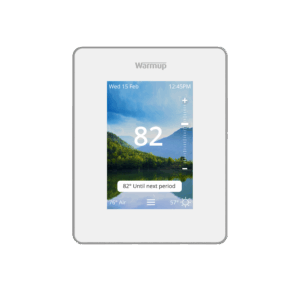
You can use the scroll bar on the right side of your 7iE Thermostat’s screen to increase the temperature.
Video Instructions
The video below will visually walk you through the process of setting a temperature override on your 7iE Thermostat:
Written Instructions
How to set a temperature override on your 7iE Thermostat
On the right side of your thermostat’s screen, you will see a vertical scroll bar with a ‘+’ icon on the top and a ‘-‘ icon on the bottom. To override the thermostat’s current programming and temporarily increase the temperature, you can either:
- Scroll along the scroll bar until the screen displays the desired temperature, or
- Press the ‘+’ and ‘-‘ icons until the screen displays the desired temperature.
Once the screen shows the temperature you would like your system to heat to, press “Accept” in the bottom right of the screen. The Heating Indicator will appear and your floor will begin heating to the new, overridden temperature. The floor will continue to heat until either:
- The next scheduled program begins (in which case, the override will end, and the regular programming will resume), or
- You manually end the heating period.
How to cancel a temperature override on your 7iE Thermostat
When a temperature override is currently running, you will see a button appear above the menu icon that states the temperature you selected and the time that that override will run until.
If you have set a temperature override that you would like to end, simply press the button above the menu icon (the 3 bars) that says “[Set Degrees] until [Time] X”. This will turn off the temperature override and resume your previous programming.
Additional Assistance
For more 7iE Instructional Videos, check out our playlist on YouTube.
If you have any additional questions or concerns, please don’t hesitate to reach out to us. Our support team is available to assist you and address any inquiries you may have. To access our support services, simply call us at (888) 927-6333.