
How Do I Identify Which Warmup Thermostat I Have?
The quickest way to identify your Warmup thermostat is to check the model name on the packaging or installation manual. If you don’t have those, you can tell the models apart by orientation (portrait or landscape), whether the screen is a touchscreen, and the buttons on the face. Warmup currently sells the 7iE, Terra, and EZPT. The 6iE, 4iE, 3iE, RFT, Tempo, UCCG-4991, WUDG, and TH115 are discontinued but still supported.
Warmup thermostat models at a glance
| Thermostat | Status | Orientation | Color | Screen and controls | Easiest way to recognize it |
|---|---|---|---|---|---|
| 7iE | Current | Portrait | White | Touchscreen, +/- scroll bar | Only a silver “Warmup” logo on the face, clear “Test” tab bottom left, “7iE” inside the faceplate |
| Terra | Current | Portrait | White | Not a touchscreen; up, down, check, and X buttons below the display | Portrait with 4 buttons below the screen |
| EZPT | Current | Portrait | White | Color touchscreen, red temperature and setting buttons | LED error light in the top left corner, GFCI Test and Reset buttons on the top |
| 6iE | Discontinued | Portrait | White | Touchscreen, +/- scroll bar | Looks identical to 7iE; no model number inside the faceplate |
| 4iE | Discontinued | Portrait or landscape | White or black | Touchscreen | “Test Monthly” printed on the face with an arrow to the test button |
| 3iE | Discontinued | Landscape | White or black (interchangeable color lenses available) | Not a touchscreen; up, down, check, and X buttons below the display | Landscape with 4 buttons below the screen |
| RFT | Discontinued | Portrait | White | Touch buttons: back, up, down, OK | Heating indicator light in the top left corner |
| Tempo | Discontinued | Landscape | Black | LED screen with a dial | Only model with a dial |
| UCCG-4991 | Discontinued | Portrait | White | Small LED screen, 5 buttons | “OJ Microline” logo above the screen |
| WUDG | Discontinued | Portrait | White, gray bezel | LED screen, 3 gray rectangular buttons below and 1 round button to the right | White “Warmup” logo below the screen |
| TH115 | Discontinued | Portrait | White, gray bezel | LED screen, round gray buttons on both sides behind 2 doors | Side doors covering the buttons |
How do I tell a 6iE from a 7iE?
The 6iE and 7iE look the same from the outside. There are 2 ways to tell them apart:
- Check the Network screen. Press the 3 bars at the bottom of the screen, then Settings > Network.
- 6iE: a QR code to connect to MyHeating.
- 7iE: 2 buttons, “Connect with MyHeating App” and “Connect with Matter App.”
- Check inside the faceplate. Remove the faceplate.
- 6iE: no model number.
- 7iE: “7iE” printed in black.
The 6iE was discontinued in mid-to-late 2025, so a thermostat with this design bought in late 2025 or later is most likely a 7iE.
Other frequently asked questions
What is the newest Warmup thermostat?
The 7iE Smart Matter Thermostat is Warmup’s newest model. It works with the MyHeating app and Matter, so it can connect to Amazon Alexa, Apple Home, Google Home, and other smart home ecosystems.
Which Warmup thermostats are discontinued?
The 6iE, 4iE, 3iE, RFT, Tempo, UCCG-4991, WUDG, and TH115 are discontinued. Warmup currently sells the 7iE, Terra, and EZPT.
Which Warmup thermostats work with the MyHeating app?
The 7iE, Terra, 6iE, and WiFi versions of the 4iE work with MyHeating. You can manage different models on one account.
Does Warmup still support discontinued thermostats?
Yes. Guides for every model are in Warmupedia, and the support team can help at (888) 927-6333 or ussales@warmup.com.
Choose your product
How do I know if my thermostat is a 7iE?
The 7iE is a white portrait touchscreen thermostat with “7iE” printed inside the faceplate. It is Warmup’s current smart thermostat and works with the MyHeating app and Matter.
Status: Current model.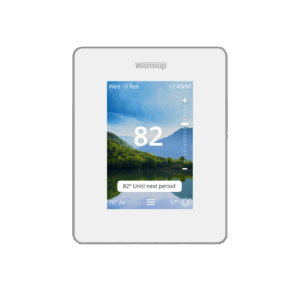
- White faceplate, portrait orientation
- The only marking around the screen is a silver “Warmup” logo
- Clear “Test” tab on the bottom left
- Home screen has a scroll bar with a “+” on the top and “-” on the bottom
- Network screen shows “Connect with MyHeating App” and “Connect with Matter App”
How do I know if my thermostat is a Terra?
The Terra is a white portrait thermostat with a silver bezel and 4 buttons below the display: up, down, check, and X. Unlike the iE series, it doesn’t have a touchscreen.
Status: Current model.
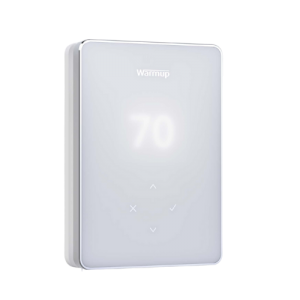
- Entirely white face with a silver bezel
- Portrait orientation
- Not a touchscreen
- 4 buttons below the display: up arrow, down arrow, check mark, X
How do I know if my thermostat is an EZPT?
The EZPT is a white portrait thermostat with a color touchscreen, red temperature and setting buttons, and an LED error light in the top left corner. It is Warmup’s current programmable (non-WiFi) thermostat.
Status: Current model.
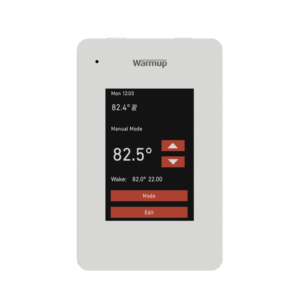
- White faceplate, portrait orientation
- Color touchscreen with red temperature control and setting buttons
- LED error indicator light in the top left corner
- Test button in the top right and Reset button in the top left
How do I know if my thermostat is a 6iE?
The 6iE looks identical to the 7iE. It’s a 6iE if the Network screen shows a QR code instead of MyHeating and Matter buttons, and there’s no model number inside the faceplate. See how to tell a 6iE from a 7iE.
Status: Discontinued.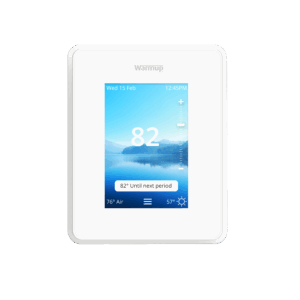
- Same features as the 7iE (white, portrait, silver logo, clear Test tab, +/- scroll bar)
- Network screen shows a QR code to connect to MyHeating
- No model number inside the faceplate
How do I know if my thermostat is a 4iE?
Every 4iE has “Test Monthly” printed on its face with an arrow pointing to the GFCI test button, and no physical control buttons. It comes in white or black, portrait or landscape, and WiFi or non-WiFi versions.
Status: Discontinued.
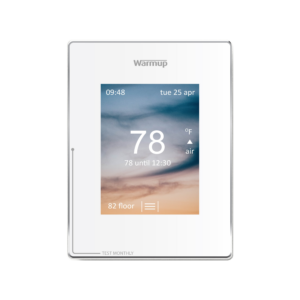
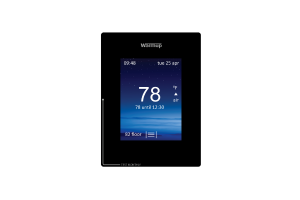
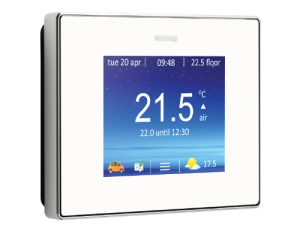
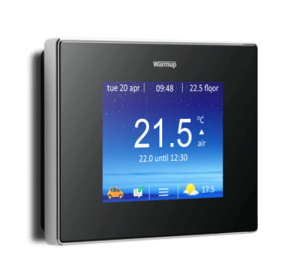
On every 4iE:
- Silver “Warmup” logo above the touchscreen
- “Test Monthly” printed on the face with an arrow to the GFCI test button
- No physical control buttons
Variations:
- White or black faceplate
- Portrait or landscape orientation
- WiFi or non-WiFi
Is my 4iE Wi-Fi or non-WiFi?
Go to the 4iE’s About screen. If a device number is shown, it’s a WiFi model. If there’s no device number, it’s non-WiFi.
How do I know if my thermostat is a 3iE?
The 3iE is a landscape thermostat with a silver “Warmup” logo above the screen and 4 buttons below it: check, X, up, and down. The screen is not a touchscreen.
Status: Discontinued.
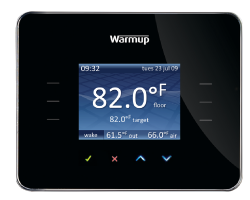
- Landscape orientation
- Black or white faceplate by default, with interchangeable color lenses
- Silver “Warmup” logo above the screen
- Not a touchscreen; 4 buttons below the screen
How do I know if my thermostat is an RFT?
The RFT is a white portrait thermostat with 4 touch buttons along the bottom (back, up, down, and OK) and a heating indicator light in the top left corner. It’s a basic programmable thermostat.
Status: Discontinued.
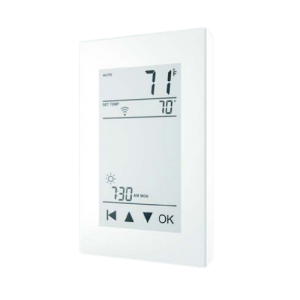
- White faceplate, portrait orientation
- Capacitive touchscreen display
- 4 touch buttons at the bottom: back, up, down, OK
- Heating indicator light in the top left corner
How do I know if my thermostat is a Tempo?
The Tempo is the only Warmup thermostat with a dial. It is a black landscape thermostat with an LED screen on the left and the temperature dial on the right.
Status: Discontinued.
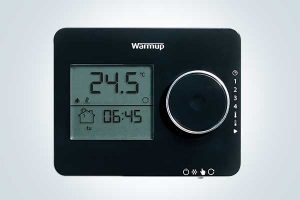
- Entirely black, landscape orientation
- LED screen on the left
- Temperature dial on the right, used to adjust the temperature manually
- White “Warmup” logo above the screen and dial
How do I know if my thermostat is a UCCG-4991?
The UCCG-4991 is a white portrait thermostat with an “OJ Microline” logo above a small LED screen. It is the only Warmup-supplied thermostat with that logo.
Status: Discontinued.
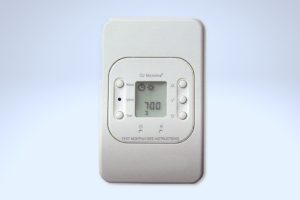
- Entirely white, portrait orientation
- Small LED screen in the center
- 5 control buttons to the left and right of the screen
- “OJ Microline” logo above the screen
How do I know if my thermostat is a WUDG?
The WUDG is a white portrait thermostat with a gray bezel around its LED screen, 3 gray rectangular buttons below the screen, and 1 round button to the right.
Status: Discontinued.
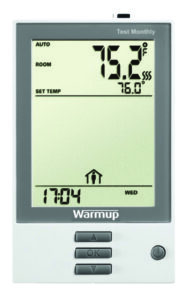
- Mostly white face with a gray bezel around the LED screen
- Portrait orientation
- 3 gray rectangular control buttons below and 1 round button to the right
- White “Warmup” logo below the screen
How do I know if my thermostat is a TH115?
The TH115 is a white portrait thermostat with 2 small doors on its sides that cover round gray buttons. It has a gray bezel around the LED screen and a white “Warmup” logo below it.
Status: Discontinued.
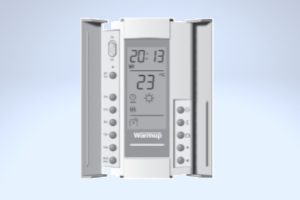
- Mostly white face with a gray bezel around the LED screen
- Portrait orientation
- 2 doors on the sides that cover multiple round gray buttons
- White “Warmup” logo below the screen