
What are the Three Setting Dials around the Large Timer on the WSM-63?
Change the Settings on Your WSM-63 Controller
The three dials around the large timer dial on the WSM-63 allow you to change the settings of the controller.
A → Yellow LED: Power ON (U)
B → Red LED: Timing in progress (C)
C → Unit of time selected
D → Time scale selector
E → Function selected
F → Function selector: AI, DI, GI, SW, BE, CEa, DE
G → Time selected: 0.5, 1, 5, 10
H → Unit of time selector: Sec (second), Min (minute), H (hour), hx10 (10 hour)
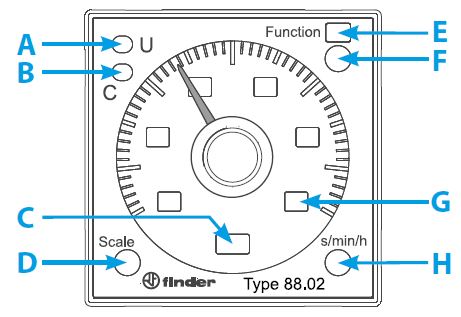
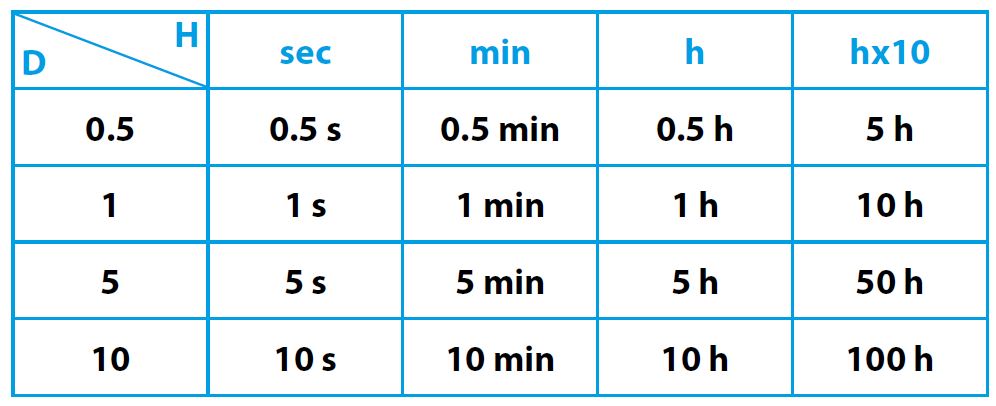
Do not touch the function settings in the top right corner and leave at the default factory settings. The time scale selector and unit of time will usually need to be adjusted. Warmup recommends setting H to hour and D to 5 or 10 depending on the specific needs of the snow melting system.
For more information, refer to the WSM-63 specification sheet.